

Sync engines and sync-based apps have recently exploded in popularity and mindshare. And for good reason.
They claim to offer snappier user experiences and simpler developer ergonomics, all by automating the process of moving data back and forth over the network. They make data fetching and mutation as easy as interacting with a local, reactive database, which is kept in sync with the backend database automatically.
A sync engine keeps a local database and a server database in continuous, bidirectional sync, so apps can read and write locally while replication happens in the background.
For people who have built native applications, the idea of working with a local database might sound familiar and obvious. I remember talking to one of my uncles who is an old school .NET developer building desktop apps. Most of his career he has written code that ships to users’ devices, and it bundles a SQL Server instance that runs locally and stores all the data. And I was trying to explain to him how after 2 decades of complicated web frameworks, people are realizing that the same local database architecture is not only simpler, but much superior.
So what are the benefits that sync engines promise exactly?
- Application loads immediately with local data
- Navigation between screens is instant
- Changes are immediately reflected everywhere, including to other clients in real time
- Network connection is not required to access the data
- Complex and brittle cache management logic disappears
- Reactivity across the stack
- Radically simpler mental model
- Efficient data flow from the server to the client
To understand the benefits better, let’s step back into history for a bit and see how client-server state management has been handled traditionally.
Approaches to Async State Management
Manual
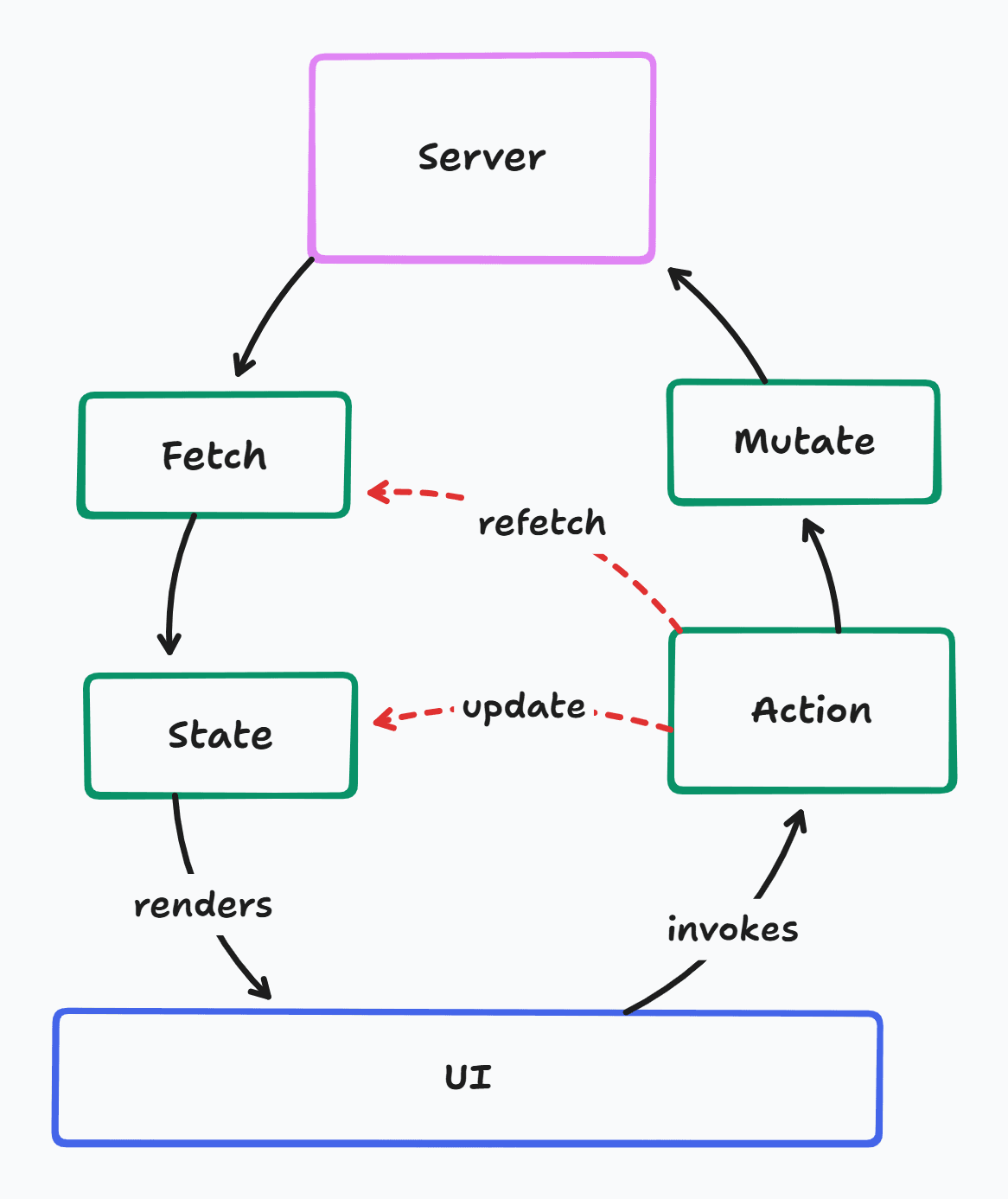
- Data was usually fetched from the server once the client application loads, and stored in local state.
- When the user interacts with the UI, actions are invoked, which update the local state to reflect the interaction, as well as send mutation requests to the server. They might update the state again with the server response, or trigger a refetch of the data.
- This is usually handled with procedural logic that tends to get complicated very easily as multiple locations of state need to be updated in co-ordination, or the user might see broken inconsistent states.
- Data models often need to be duplicated between the server and the client
Keyed Queries
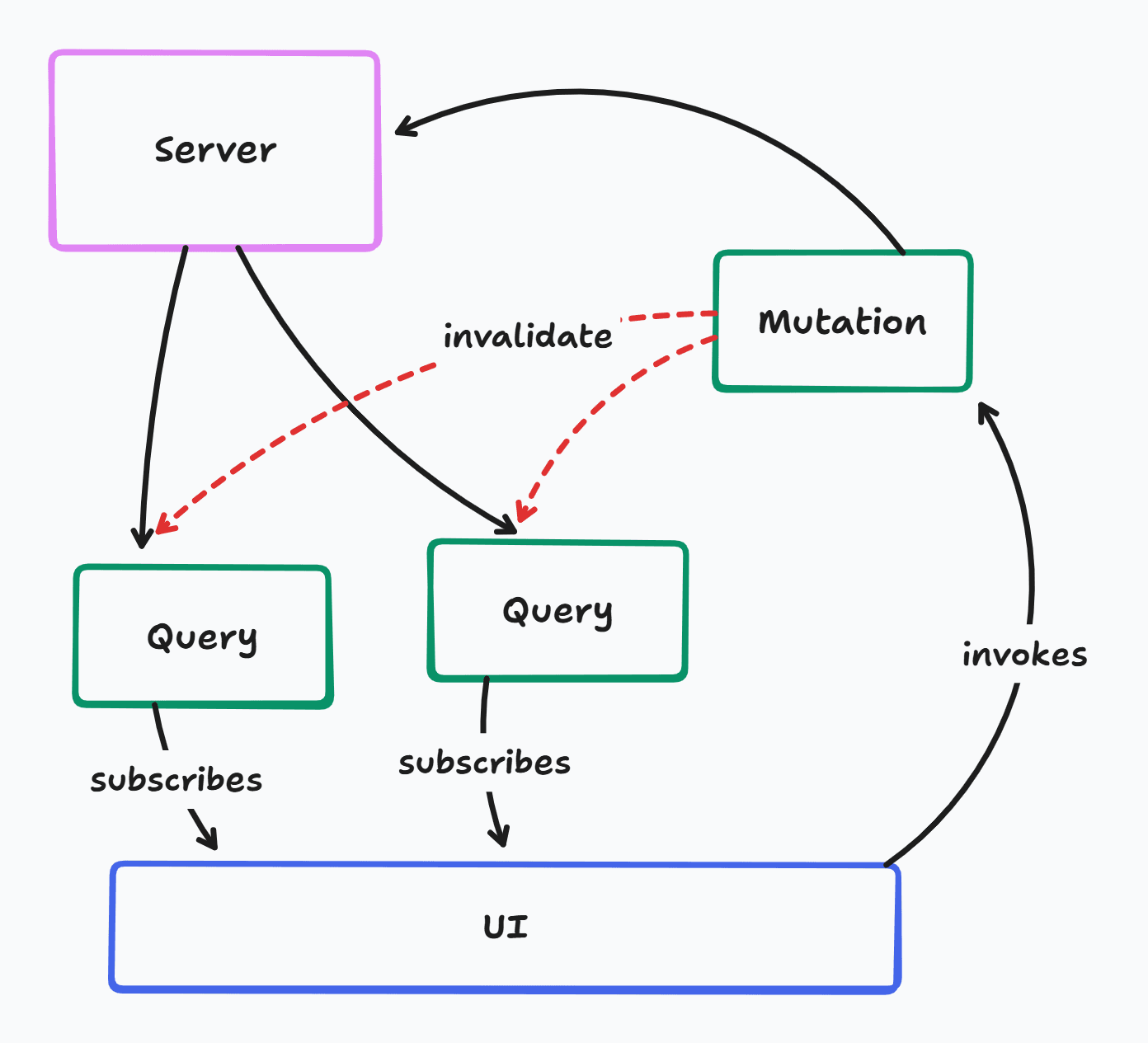
- Data is fetched through keyed queries that can be invalidated
- Mutations can simply invalidate queries with no knowledge of the data structures
- Invalidated queries automatically refetch and update everywhere in the UI
- Optimistic updates get complex for the same reasons as manual mutations
Sync Engine
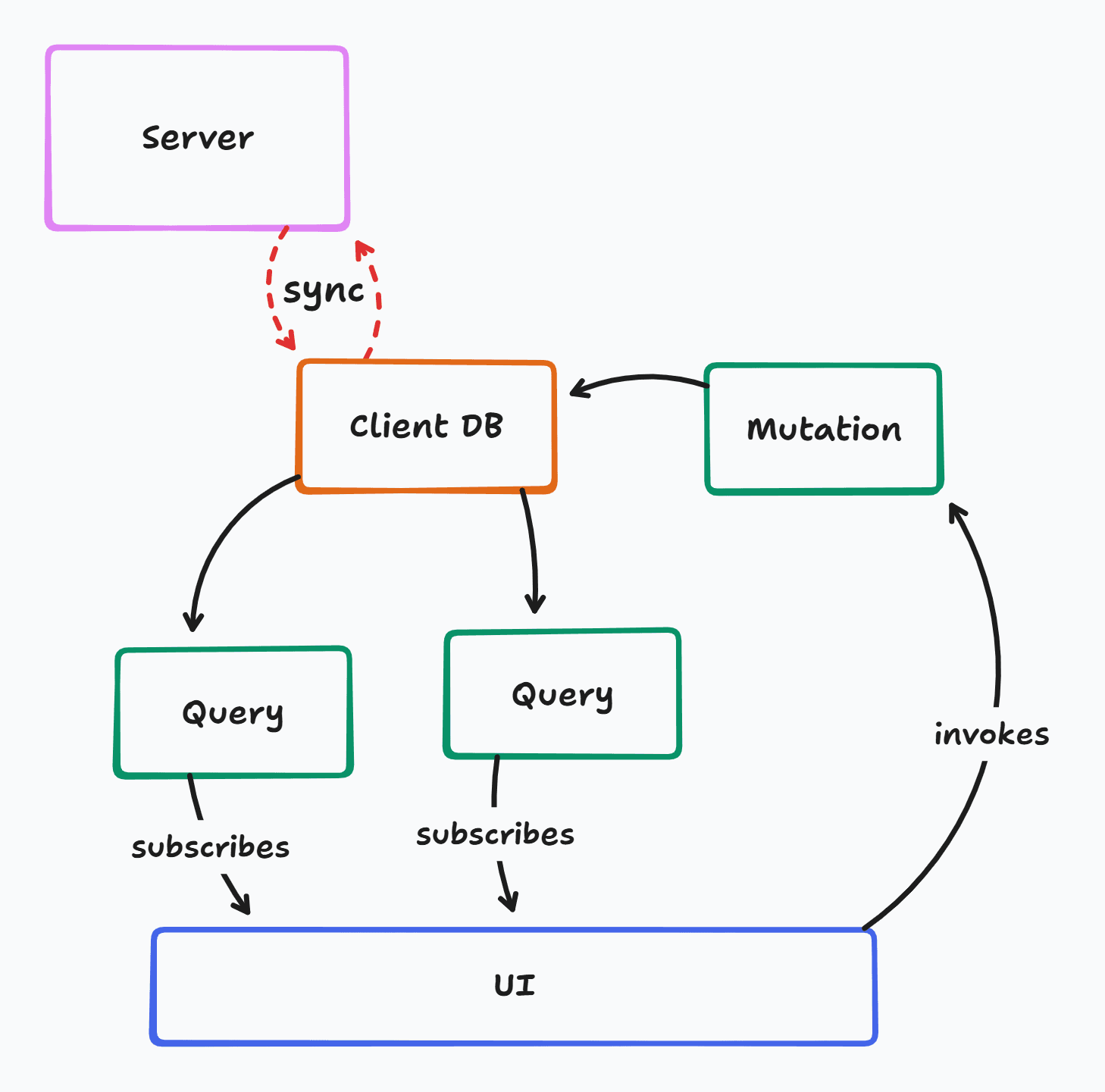
- Mutations go directly to a local database
- Any affected queries automatically rerun, no invalidation logic required
- Optimistic updates for free
- Syncs automatically with server database
- Real-time for free
Comparison
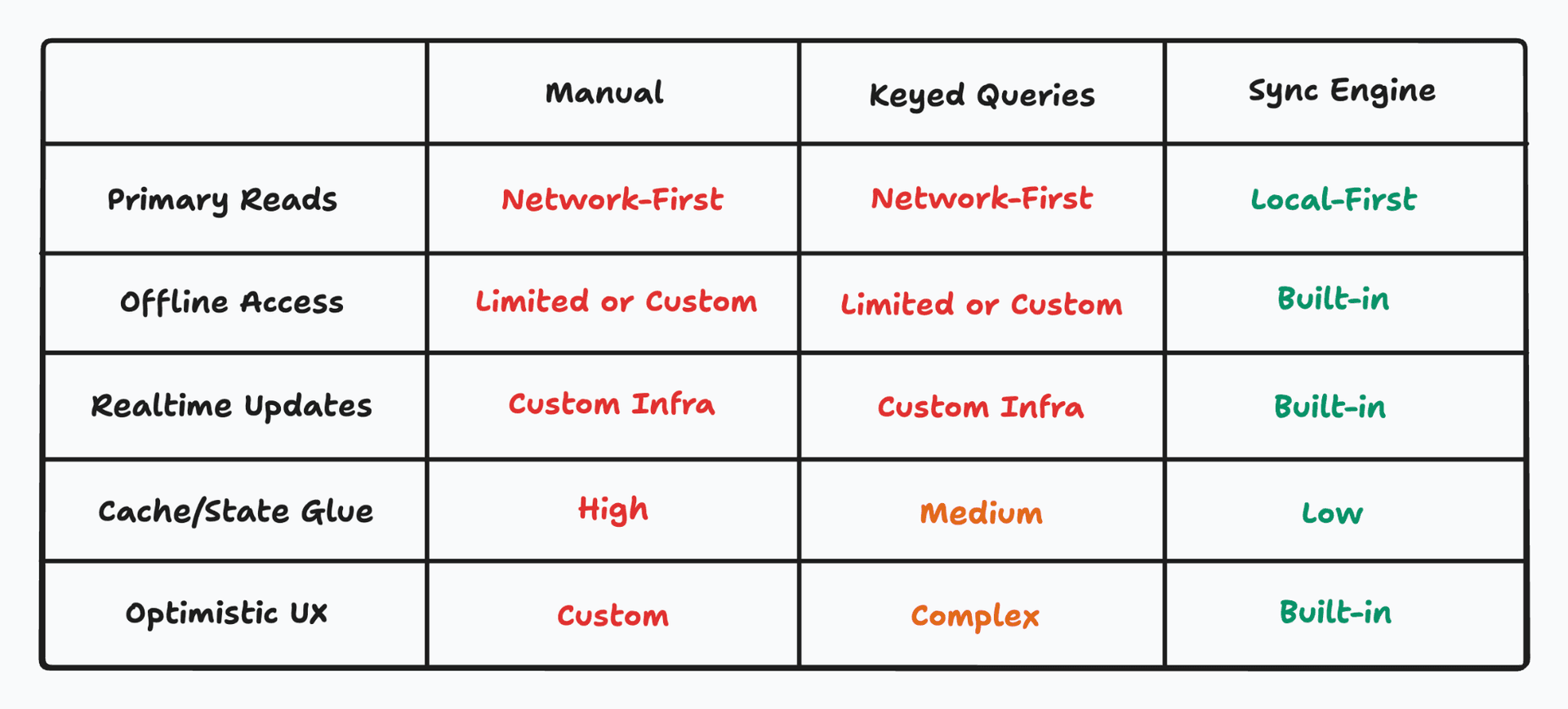
Can Sync Engines Deliver?
UX expectations are at an all-time high in the industry and don’t show signs of stopping
- The demand for software is only going up
- Users need fast, real-time interfaces to be productive in their work
- LLMs are putting even more stress on our infrastructure by forcing us to handle long-running and failure-prone streams of tokens
- Managing complicated client and server state becomes difficult and slows down development
Sync engines equip developers to better tackle the complexities of client-server application development while ensuring a fast, snappy, and real-time user experience by default.
At the same time, a simpler mental model helps coding agents work better in the codebase, since there are less opportunities for the agents to make mistakes.
This is the power of sync.
And do sync engines today deliver on this?
Well…. yes, mostly, but there are tradeoffs.
-
Sync engines can be notoriously difficult to integrate with existing backends
-
Not every sync engine is stable, mature, or production-ready
-
Many require rewriting code to fit their assumptions
-
Might lock you in to a specific database and query layer
-
Might not support your target client runtime
-
Might lack enterprise-grade compliance features
-
Might not support offline-first workflows
You probably want a sync engine that is
- simple to integrate
- stable and mature
- pluggable into existing setups
- low lock-in
- runs everywhere
- enterprise compliance-ready
- offline-first
PowerSync is one such sync engine.
Most sync engines still assume a narrow stack: a specific backend, a specific client runtime, or both. That forces teams to re-platform or settle for a web-only experience. PowerSync is designed to be backend-agnostic and multi-client from day one, so you can adopt it without rewriting core infrastructure and keep one sync layer across web, mobile, and desktop.
Building with PowerSync - Collaborative Agentic Chat
I have been building a shared workspace where users and agents can chat and collaborate with each other on work.
It’s like Discord or Slack but if Agents were a first-class citizen, like Users.
Let's see how PowerSync makes it simple to build these kind of apps.
NOTE: The code snippets shown below are simplified to highlight the interaction with PowerSync. Many parts of the code that deal with UI specific logic have been hidden.
Channel Creation
Let’s start with a simple feature - the ability to create channels and invite users and agents to it.
![Screen Recording 2026-02-05 at 2.41.17 PM.mov [video-to-gif output image]](/images/blog/unleashing-the-power-of-sync-inline-c83646f683.gif)
Implementing this is as straightforward as a couple of SQL queries in the form submit handler
const handleChannelCreate = async (name) => {
  await writeTransaction(async (tx) => {
    // Insert channel
    await tx.execute(
      `INSERT INTO channels (name, created_by) VALUES (?, ?)`,
      [name, username]
    );

    // Add user as member
    await tx.execute(
      `INSERT INTO channel_members (channel_id, member_type, member_id) VALUES (?, 'user', ?)`,
      [channelId, username]
    );

    // Auto-add default assistant agent
    await tx.execute(
      `INSERT INTO channel_members (channel_id, member_type, member_id) VALUES (?, 'agent', ?)`,
      [channelId, defaultAgent]
    );
  });

  navigate(`/channel/${channelId}`);
};
The Channel list on the left simply queries the database for channels and shows them. Query reruns and updates the UI automatically when the new channel is added.
function ChannelList() {
  const channels = useWatchedQuery(
    () =>
      `SELECT c.* FROM channels c
      JOIN channel_members cm ON cm.channel_id = c.id
      WHERE cm.member_type = 'user' AND cm.member_id = ?`,
    () => [username() || ""]
  );

  return <For each={channels.data}>
    {(channel) => (
      <A href={`/channel/${channel.id}`}>
        # {channel.name}
      </A>
    )}
  </For>
}
Without a sync engine, this would be a little complicated to implement.
- Any queries showing a list of channels on the screen need to be invalidated
- Cannot navigate to the new channel until the server responds with okay
User Invites and Real-Time Updates
Let’s say adding a user to a channel should make the channel available in their UI like this:
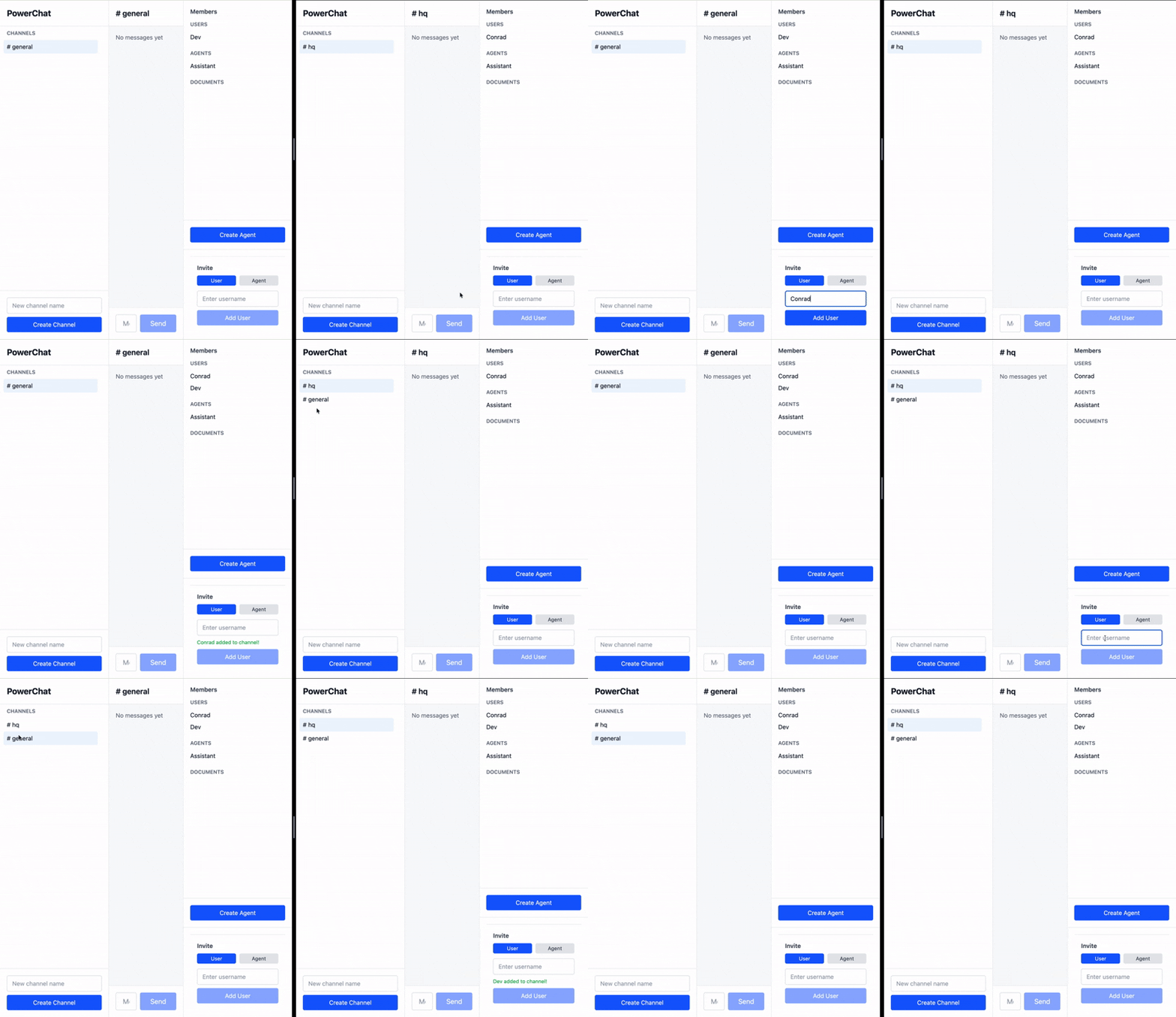
Shouldn't be a surprise that adding this functionality is as simple as writing a SQL query:
const handleInviteUser = async (invitedUsername) => {
  await writeTransaction(async (tx) => {
    await tx.execute(
      `INSERT INTO channel_members (channel_id, member_type, member_id)
         VALUES (?, 'user', ?)`,
      [props.channelId, invitedUsername],
    );
  });
};
Reactivity makes it simpler to extend the business logic and add features.
Without a sync engine, this might require a separate real-time notifications setup, which subscribes clients to topics and requires writing glue logic between the notification service, state management, and query invalidation. PowerSync reduces everything to SQL queries running against a local DB.
Send and Receive Messages
Frequent bi-directional communication is where most applications and infrastructure configurations tend to break down. However, sync engines make it feel like a piece of cake, and PowerSync reduces everything down to SQL queries like normal business.
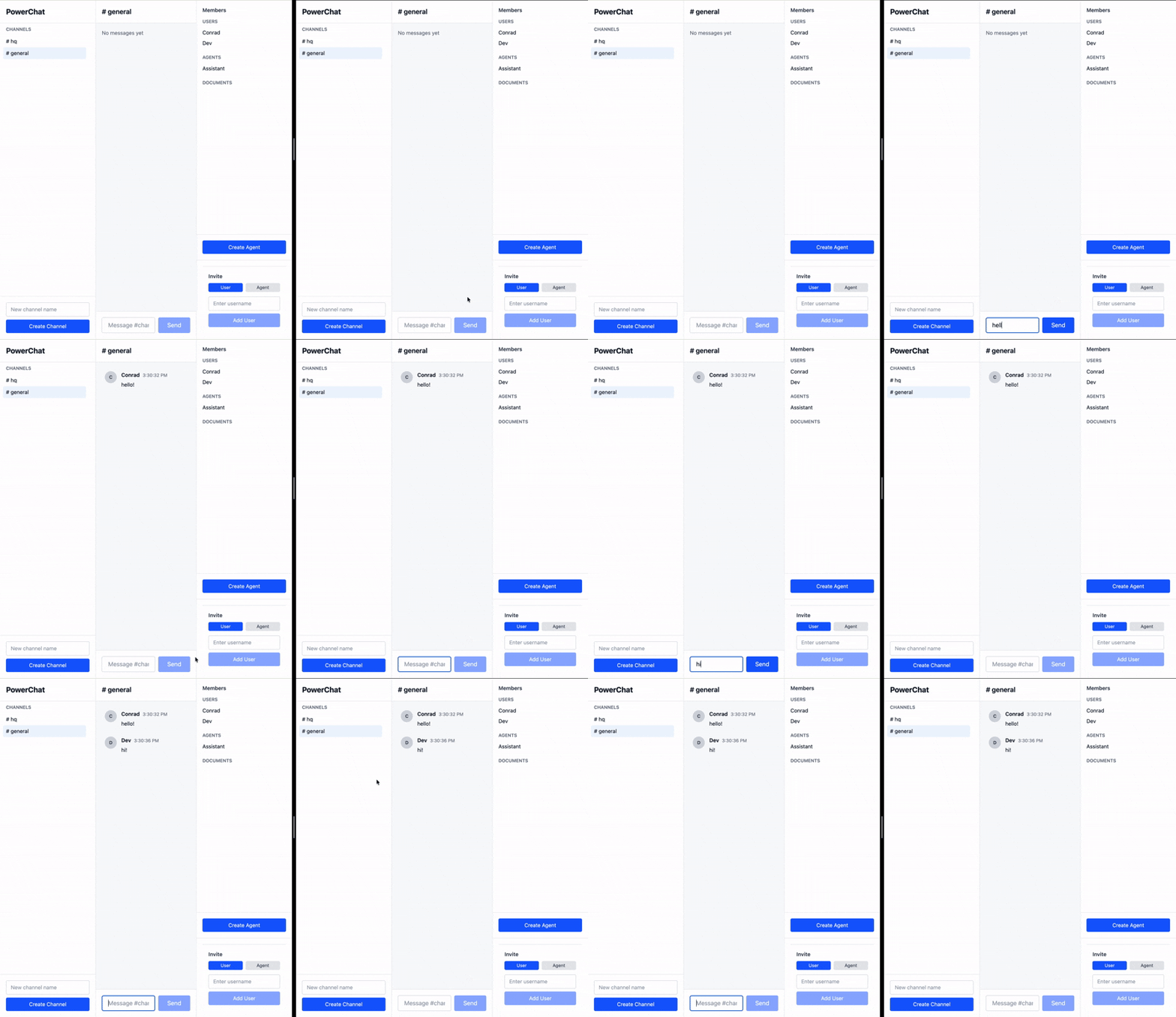
Listing out the messages in a channel is as simple as a query with some JOINs for the author names.
export function ChatMessages(props: ChatMessagesProps) {
  const messages = useWatchedQuery(
    () =>
      `SELECT m.*, a.name AS author_name
       FROM messages m
       LEFT JOIN users u ON m.author_type = 'user' AND u.id = m.author_id
       LEFT JOIN agents a ON m.author_type = 'agent' AND a.id = m.author_id
       WHERE m.channel_id = ?
       ORDER BY m.created_at ASC, m.id ASC`,
    () => [props.channelId],
  );

  return <For each={messages.data}>
    {(message) => {
      return (
        <div>
          <span>{message.author_name}</span>
          <span>{message.created_at}</span>
          <RenderMarkdown>{message.content}</RenderMarkdown>
        </div>
      );
    }}
  </For>
}
Sending a message just adds it to the table. No extra fuss.
const handleMessageSend = async (text) => {
  await writeTransaction(async (tx) => {
    return tx.execute(
      `INSERT INTO messages (channel_id, author_type, author_id, content) VALUES (?, 'user', ?, ?)`,
      [props.channelId, username, text],
    );
  });
};
And as usual, real-time updates come out of the box.
Without a sync engine, this setup would require developers to define WebSocket messages and session-based state management both on the server and client, which often leads to messy logic requiring conversions from event formats to state updates, along with the infrastructure challenges of high-volume scalable realtime services.
Agentic Integrations
This is a more recent and more interesting challenge being faced by app developers.
To understand the challenge of integrating LLM agents, let’s go back to the manual/keyed state management approach and understand what integrating with agents look like in code.
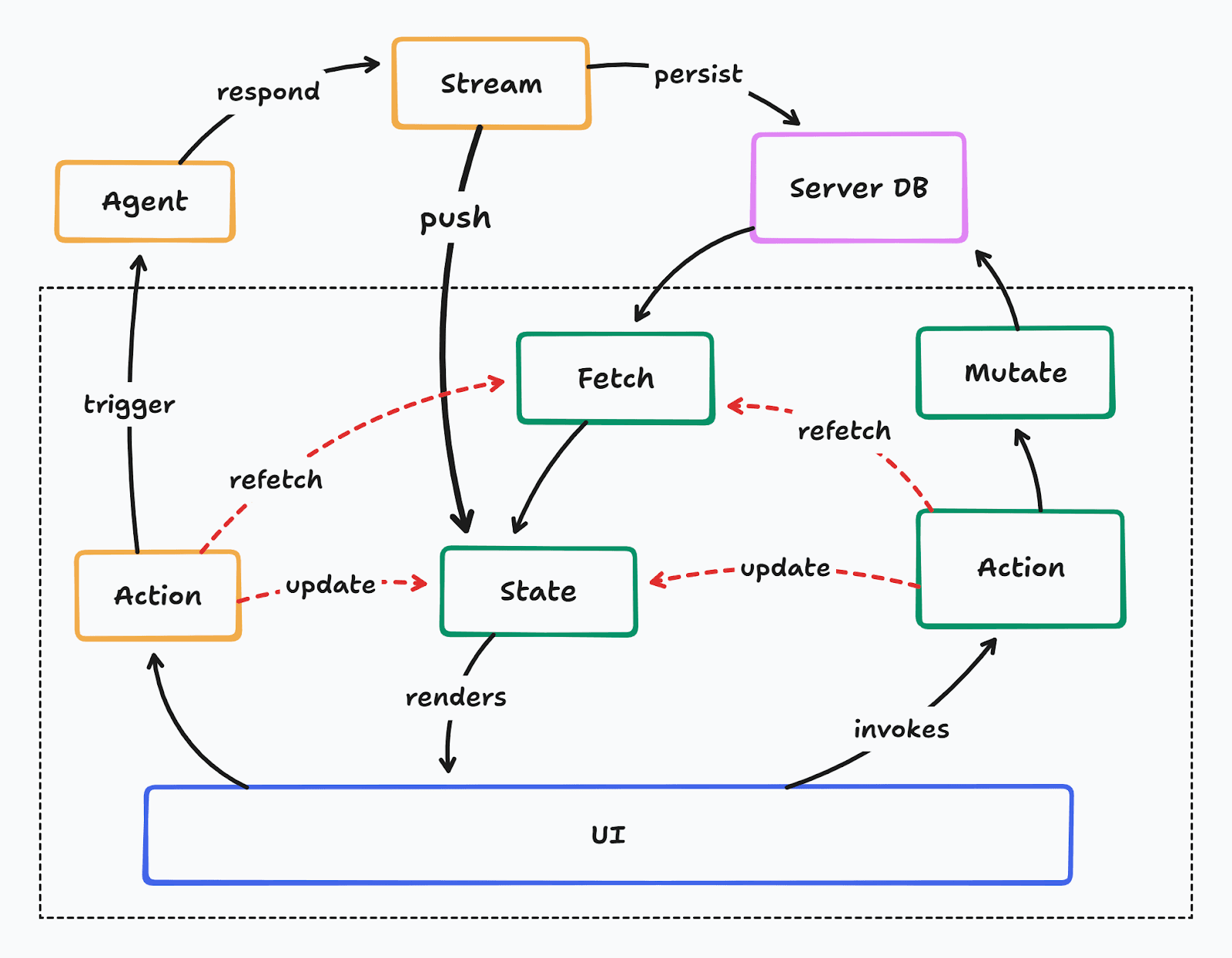
Certain actions, alongside requesting mutations that update the server database, might also trigger agents on the server. Then they update local state to reflect the in-progress agent work. Agents usually respond with a stream of tokens, that then need to be pushed to the client through HTTP/SSE/WebSocket streams. Once the stream completes, the action might trigger refetching to ensure the latest query data is fetched for the client.
This way of building agentic integrations into apps has all the same issues of manual state management, along with a new one - streaming infrastructure. Agents could be running for long periods of time, and they stream tokens all throughout their lifetime. This stream not only needs to be continually pushed to the client, but also persisted on the server, and the client needs to ensure it doesn’t go out of sync with the server and show broken responses.
A sync-based architecture could simplify this integration by removing the need to stream token responses separately.
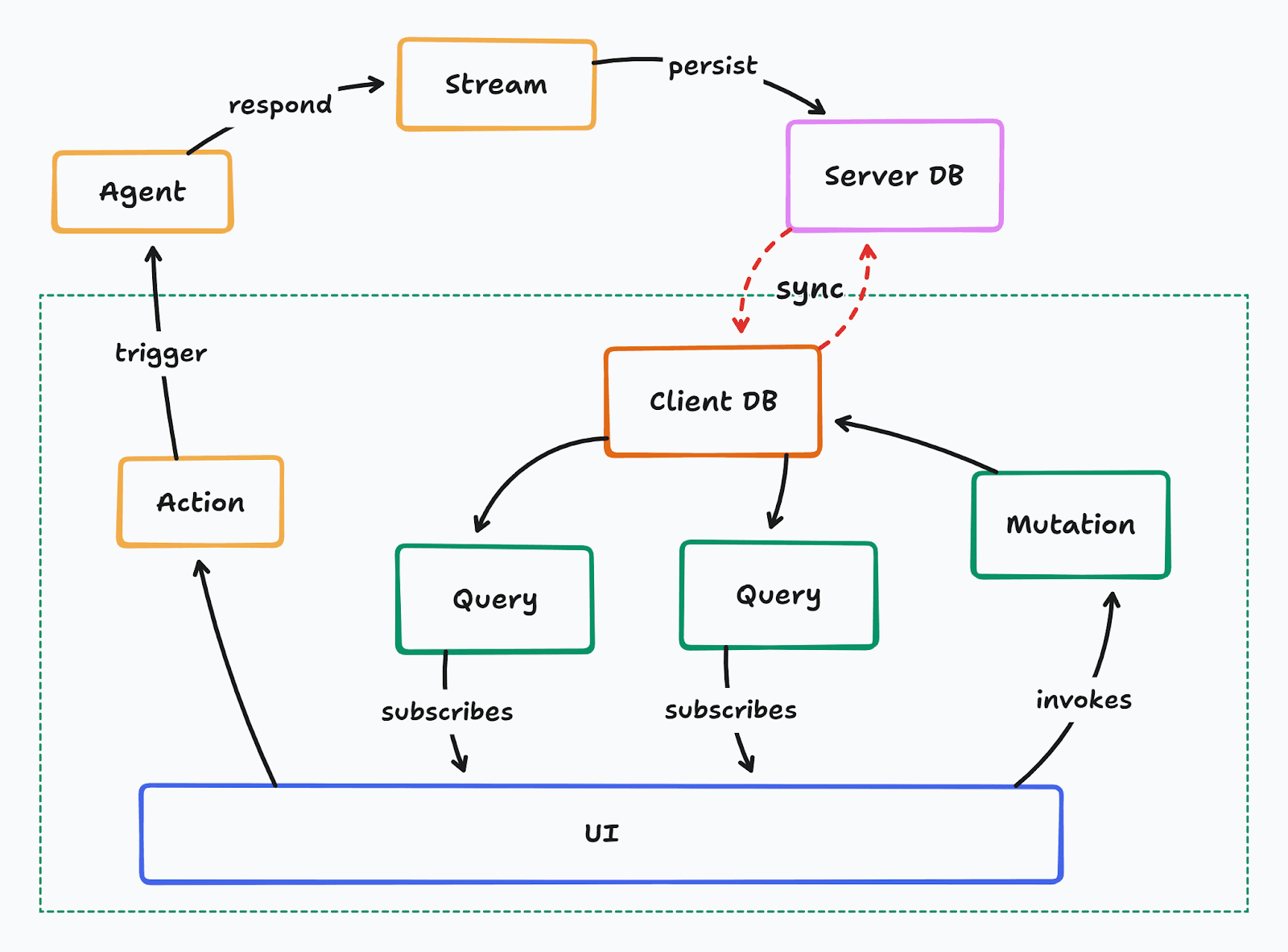
Instead, the agent response is simply persisted to the database, which gets synced automatically to the client database, immediately reflecting in the UI. This also works flawlessly with multiple users looking at the same channel.
However one issue still remains: the agent relies on a brittle request-response cycle between the client and the server. If either side disconnects for any reason, the agent execution can be interrupted in-flight with no recovery.
This can be addressed by abstracting the agent behind the sync entirely.
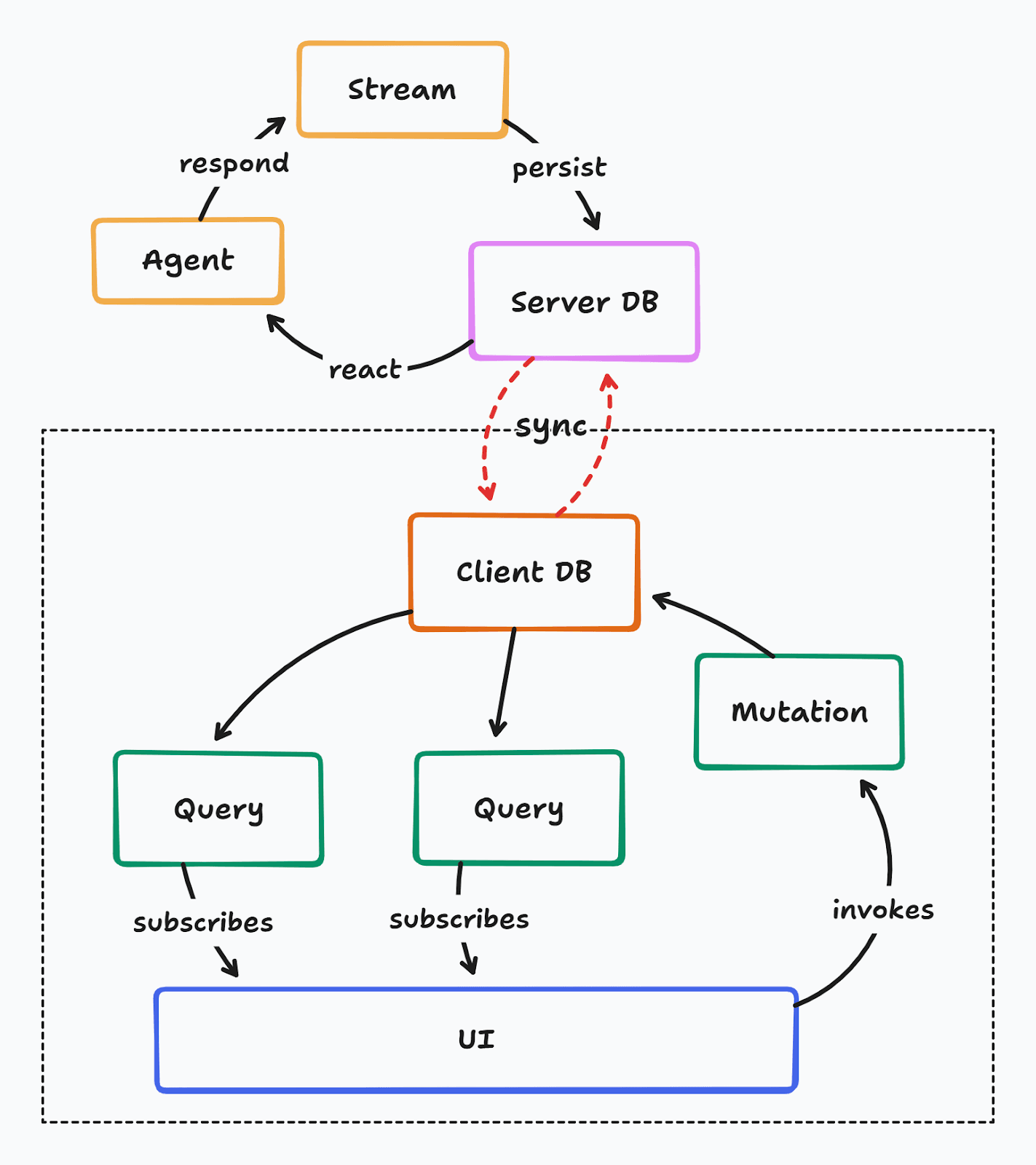
The agent can respond directly to changes made in the database, and stream responses back to the database. The client never needs to make a separate request to trigger an agent and stream tokens - it simply mutates the local database and the sync engine ensures the rest.
This not only simplifies agentic integrations, but also makes it easier to build multi-agent collaboration, i.e. agents that work with each other to accomplish larger and more complex tasks by delegating work where appropriate.
This pattern also makes the agents durable - i.e. they are resilient to crashes, failures, timeouts, and restarts.
for await (const userMessages of db.watch("SELECT * FROM messages WHERE author_type = 'user'")) {
  for (const message of userMessages) {
    const mentionedNames = findAgentMentions(message.content)

    const mentionedAgents = await query(
      `SELECT a.id, a.name
       FROM agents a
       JOIN channel_members cm
         ON cm.member_id = a.id::text
        AND cm.member_type = 'agent'
       WHERE cm.channel_id = $1
         AND a.name = ANY($2)`,
      [message.channel_id, mentionedNames],
    );

    await Promise.all(
      Array.from(mentionedAgents).map(async (agent) => {
        const agentMessageId = crypto.randomUUID();

        await query(
          `INSERT INTO messages (id, channel_id, author_type, author_id, content) VALUES ($1, $2, 'agent', $3, $5)`,
          [agentMessageId, message.channel_id, agentId, "Thinking..."],
        );

        const response = await agent.generate(message.content);

        await query(`UPDATE messages SET content = $1 WHERE id = $2`, [
          response.text,
          agentMessageId,
        ]);
      }),
    );
  }
}
On a high level, this is all the code needed on the server side to integrate with agents.
- The server listens to changes on the messages table
- When a new message arrives, it looks for a @mentioned name in the message
- It looks for agents in the channel with the mentioned name
- The agent is called with the user’s message
- Agent’s response is saved into the database
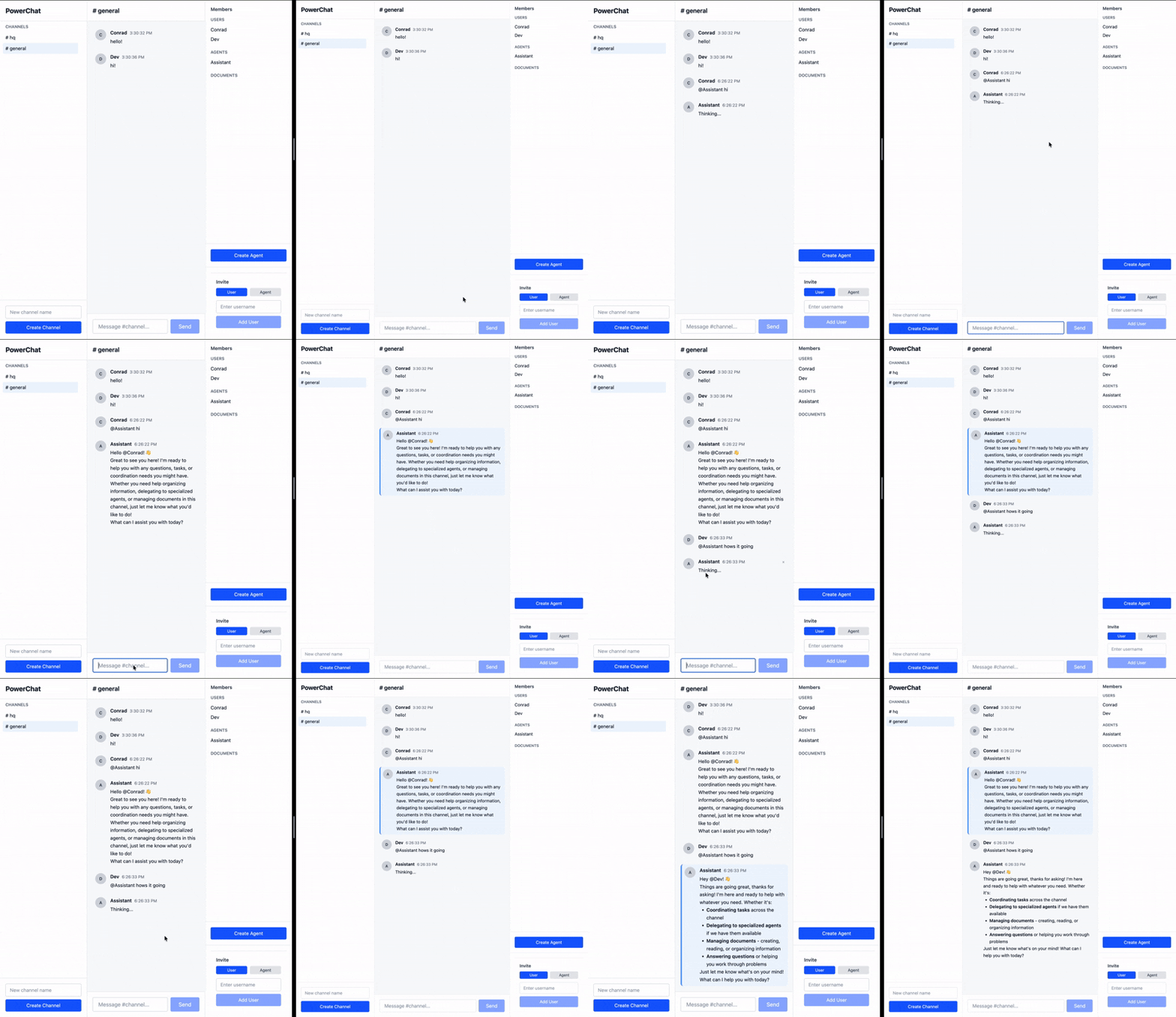
The sync engine not only ensures that messages sent by clients are received by agents, but also that the agents’ responses are synced automatically to the clients. All the processing happens asynchronously and survives network failures, crashes, and reloads. Any messages sent to the agent offline are held on client devices until they come back online, and once online, the agents immediately start responding to the pending messages, and it’s visible for everyone in the channel in real time.
NOTE: This code snippet shows a simplistic view of persisting and syncing the entire agent response once it completes. However, LLMs responses usually stream tokens granularly, and streaming each token through a sync engine is a more complicated and nuanced topic that requires an entirely separate blog post. For the purposes of this demonstration, showing the response of the agent being persisted in the database directly is simpler.
The Power of Sync
Ultimately, this is what a sync engine is about - remove the accidental complexities of application development with distributed state, and reduce it down to boring SQL queries in the UI, while all the data synchronizes automatically with whatever database I might be using.
To learn more about PowerSync, check out the documentation.